
LAL Box Configuration
Use lalui to configure your Lift & Learn box.
Prerequisite
- Having an account with editor rights at least.
ImportantThe lalbox must be CONNECTED before you can change its settings.
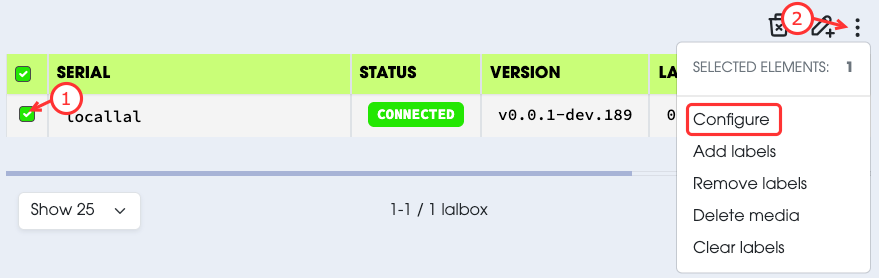
- Select the lalbox you want to configure.
- Select
Configurefrom the actions menu. - Update the configuration as you need (check media type for more details).
- Submit your request.
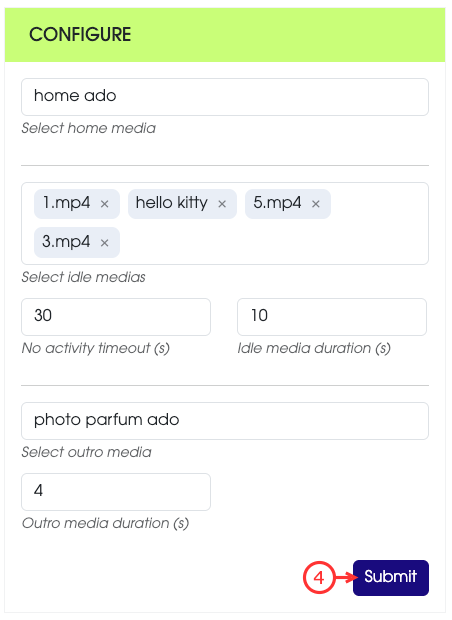
There are several parameters you can configure in the configure action:
- Home media: The default content displayed when no interraction is occuring.
- Idle medias: A set of media contents displayed at intervals when no interraction is occuring.
- No Activity Timeout (s): The timeout to display one of the idle medias.
- Idle media duration (s): The maximum duration that an idle media is displayed (if the media is longer than the duration, it will be stopped).
- Outro media: The media played automatically after each product-related media when the full media duration has been reached.
- Outro duration (s): The duration the outro media is lasting (if the media is longer than the duration, it will be stopped).
You can check the current configuration on the lalbox by clicking on the little information button when hovering the lalbox serial.
This will display a popup with all the lalbox information. Scroll down to the Configuration section.

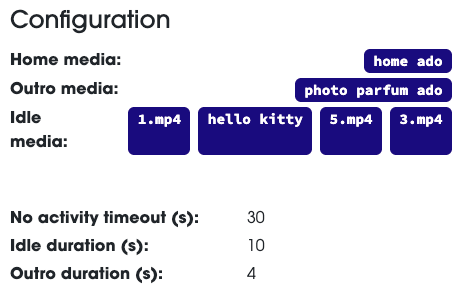
ImportantMedia with a blue background are currently downloaded locally on the lalbox machine.
Media with a grey background are not present locally on the lalbox machine, yet.