
Create DPP Template
Use enrolui to create your dpp templates.
Prerequisite
- Having an account with editor rights at least.
In order to create a template you need to fill in the following information:
- Display Name: this is the name used to identify easily a template in the system. Display names must be unique.
- Content: this is the content of the template, its structure.
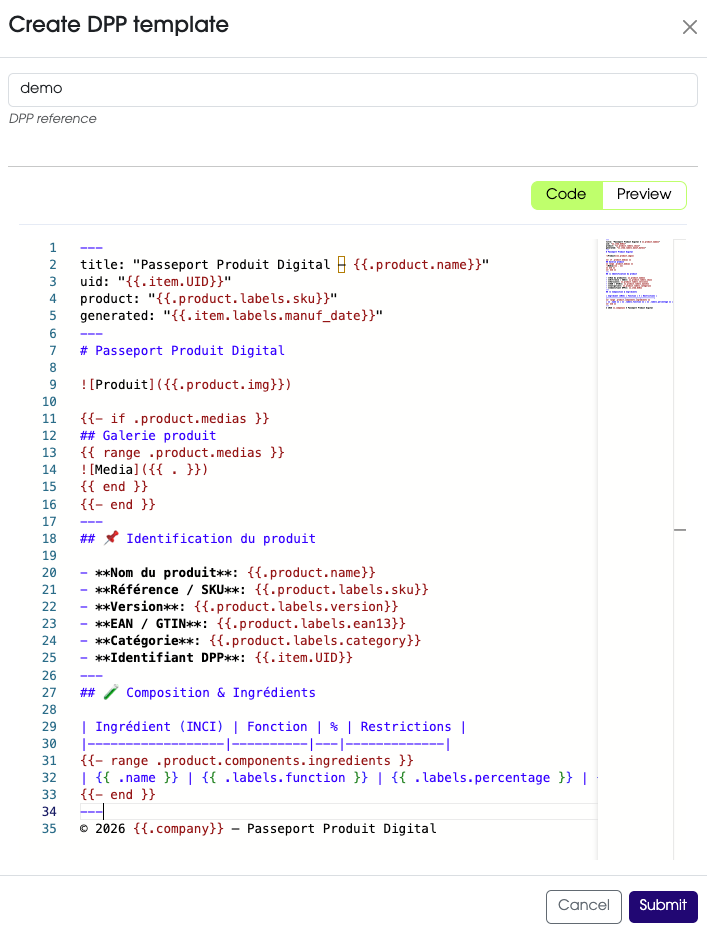
A variable is a reference inside the DPP template that is replaced with real data when the DPP is generated.
Variables follow a hierarchical structure that indicates where the data comes from and what type of data it represents.
For instance: {{ .product.name }} can become Shampoo Hydratant.
Variables allow the same template to automatically generate a passport for any item.
A variable describes where the information comes from.
Its structure is: {{ .source.type.field }}.
Example: {{ .product.labels.sku }}.
This means:
product: the data comes from the product.labels: the value is stored in product labels.sku: the value is stored in theskuproduct label.
Optional
fieldis optional for direct attributes.It is required when using:
labelscomponents
Currently there are two sources available:
| Source | Description | Supported type |
|---|---|---|
dpp |
DPP-level information. | Direct attributes |
item |
Item-level information. | Direct attributes and labels |
product |
Product-level information. | Direct attributes, labels, medias and components |
Currently there are four types supported:
-
Direct attribute: basic product or item information.
Example:{{ .product.name }} {{ .item.uid }} -
Labels: custom fields attached to product or item.
Example:{{ .product.labels.sku }} {{ .item.labels.lot }} -
Medias (product only): product DPP medias stored as list.
Example:{{ .product.medias }} -
Components (product only): structured lists of elements attached to product.
- Components are composed of:
namelabels
Example:
{{ range .product.components.allergens }} - **{{ .name }}** | {{ .labels.percentage }} {{ end }} - Components are composed of:
ComponentsBecausecomponentsandmediasare lists, they must be used with therangekeyword.
Templates can include logic to display content only when data exists.
This keyword must be placed before the placeholder: {{ KEYWORD .placeholder }}.
ImportantEach keyword must be closed by an{{ end }}statement.
For more information please check the go template userguide.
The range keyword allows you to iterate over lists, typically components.
Example:
{{ range .product.components.allergens }}
- **{{ .name }}**
{{ end }}
This will display the name of each component in the category allergens.
MediasBecause
mediasdo not have anyfield, they must be accessed with{{ . }}in the block.Example:
{{ range .product.medias }}
    {{ . }}
{{ end }}
When using conditional rendering, nested placeholders automatically refer to the current element.
Example:
{{ range .product.components.allergens }}
- **{{ .name }}**
{{ end }}
In this example: {{ .name }} refers to the name of the current allergen.
This allows templates to remain short and easy to read.
Below is a list of direct attributes available for placeholders:
| Source | Direct attribute | Placeholder | Description |
|---|---|---|---|
| dpp | name | {{ .dpp.name }} |
the product reference |
| dpp | NAME | {{ .dpp.NAME }} |
the product reference in uppercase |
| product | name | {{ .product.name }} |
the product reference |
| product | NAME | {{ .product.NAME }} |
the product reference in uppercase |
| product | description | {{ .product.description }} |
the product description |
| product | img | {{ .product.img }} |
the product favorite dpp media |
| product | url | {{ .product.url }} |
the product url |
| product | model3D | {{ .product.model3D }} |
the product favorite dpp media |
| product | dimensions | {{ .product.dimensions }} |
the product favorite dpp media |
| item | uid | {{ .item.uid }} |
the item UID |
| item | UID | {{ .item.UID }} |
the item UID in uppercase |
| item | url | {{ .item.url }} |
the product favorite dpp media |
It exists some specific variable:
{{ .company }}: displays the tenant name.{{ .COMPANY }}: displays the tenant name in uppercase.