
Digital Product Passport (DPP)
Customizationenrolui can be customized with your colors and logo on demand. Please contact support.
The Digital Product Passport (DPP) is a structured document generated automatically from product and item data. It provides detailed information about a product’s identity, composition, tracability, regulatory compliance and more. It is displayed in a standardized and easily shareable format.
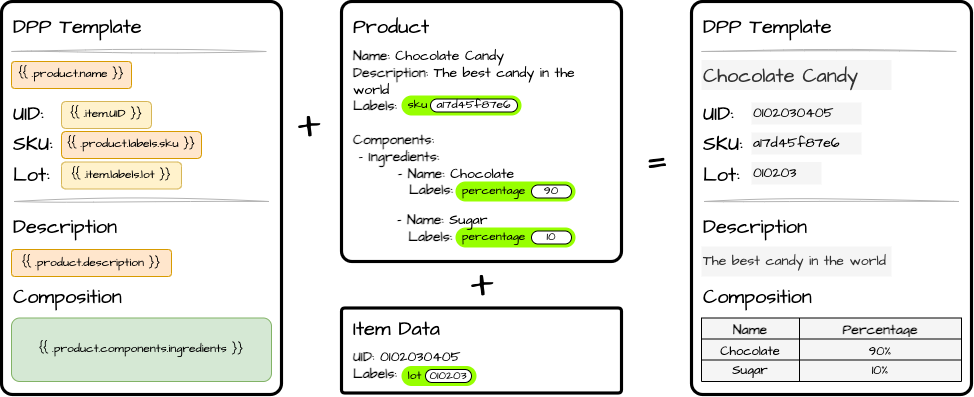
In Centiloc’s system, a DPP is defined through a template that is dynimically filled with the data of a specific product and item.
The DPP system is built around data-driven templates that transform structured product information into a complete digital document.
- The DPP template.
- Defines the structure and content of the DPP.
- References product and item data through placeholders.
- Written in
markdown.
- Product assignment.
- Creates a link between product and a DPP template.
- Defines product labels required by the DPP template.
- Defines product components required by the DPP template.
- (optional) Assigns DPP media if needed (for example, a product image).
- Item assignment.
- Creates a link between an item and a product.
- Defines item labels required by the product’s DPP template.
- Dynamic Data Injection
- Template placeholders are automatically replaced with real values taken from:
- Product informations (name, labels, media, …)
- Item informations (UID, labels, …)
- Product components (name, labels, …)
- Template placeholders are automatically replaced with real values taken from:
The result is a fully generated DPP specific to each item instance.
You can find the DPP page in enrolui. This page will list all the DPP template available to you.
In this table you will find:
- Reference: the internal name to identify the DPP template.
- Expected product labels: list of labels titles to assign to the product using the template.
- Expected item labels: list of labels titles to assign to the items using the template.
The list are automatically generated based on the template content.
