
Create and update a furniture
Use enrolui to create your furnitures.
Automate with APIBut you can use Inventory API calls to do same operation.
Ask Centiloc support for more informations!
Prerequisite
- Having one or more centiloc CADS.
- Having an account with editor rights at least.
Follow first steps to connect to enrolui and navigate to the furniture page by clicking on the Furniture box.
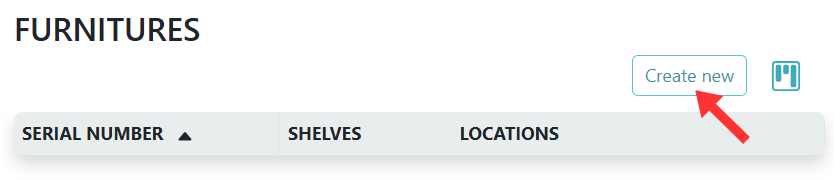
Once you are on the Furniture page you can click the Create new button.
To create a furniture, you need to have some notions about yaml.
The creation of a shelf is made through a yaml file containing all the informations.
This is the minimal structure of the .yaml file:
furniture:
    sn: "fursn"
    shelves:
        - sn: "shelsn"
          floor: 1
          dimensions_mm: [500, 200]
          offsets_mm: [0, 0, 0]
          rot_angles_degree: [0.0, 0.0, 0.0]
          boards:
            - sn: "boardsn"
              offsets_mm: [0, 0]
              z_rot_angle: 0.0
Please have in mind this picture about concepts here.
The fields are described below:
snthe serial number of your furniture. This is how you will identify it. The serial number must be unique.shelvesist a list of shelves inside the furniture. All the shelves fields are explained in create shelf page.
InformationIf the shelf does not exists, it will be automatically created.
WarningIf the shelf exists, it will be updated with the new value from your yaml.
- Click on the
YAMLtab. - Click on the
Uploadicon. - Verify the content of your
.ymlfile.
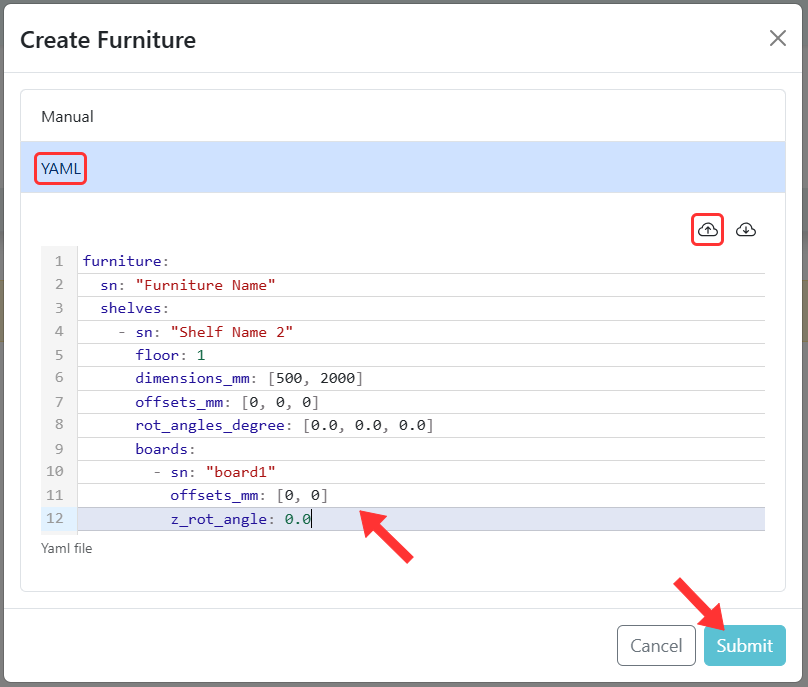
Click on Submit and then close the popup. You can now see the furniture in the table.
To update a furniture, repeat the steps above.
The update process is the exact same as the create process.
WarningBe mindful when updating a furniture, all the fields will be overwritten. Even the shelf will be overwritten!
This is why you should always keep a version of your.ymlfile to make sure to modify only the fields you need to modify.Contact Centiloc support to help you with that if you need help.