
Smart Labels
Smart Labels are special labels that Centiloc uses to make your system smarter and more dynamic.
They allow geocore services to react automatically to certain conditions — for example, checking where an item is located, or verifying that it is placed on the correct board.
In short, Smart Labels let you add intelligence and rules to your data, not just descriptions.
Smart labels always begin with a dot (.).
This prefix shows that the label has a technical purpose.
Because of this:
- Smart labels may be hidden from some pages, as they are not meant to describe the item visually.
- They can be automatically processed by geocore to trigger behaviors or checks.
Example:
.match.country.FR→ This label tells the system that the item is expected to be located in France.
Here are the main smart labels currently used by Centiloc:
| Label Format | Entity | Description | More Info |
|---|---|---|---|
.match.country.<code> |
Item | Indicates the expected country for an item (for example .match.country.FR for France). Used by the tapping redirection service to verify if a detected action occurred where it should. |
Learn more |
.match.continent.<code> |
Item | Indicates the expected continent (for example .match.continent.EU). Also used for tap verification. |
Learn more |
.matchloc.country.<code> |
Board | Defines the board’s location by country (for example .matchloc.country.FR). Used to compare with item labels. |
— |
.matchloc.continent.<code> |
Board | Defines the board’s location by continent (for example .matchloc.continent.EU). Used to compare with item labels. |
— |
Matching labels allow you to verify whether an item has been detected on the correct board — based on geographical or logical rules.
- Each item can have a label such as
.match.country.FRor.match.continent.EU.
This tells the system where the item should be located. - Each board can have a corresponding label such as
.matchloc.country.FRor.matchloc.continent.EU.
This tells the system where the board is located. - When an item is detected on a board, geocore automatically compares the two.
| Situation | Result | Description |
|---|---|---|
The item has no .match.* label |
NO_MATCH (0) | The item does not participate in matching logic. |
The item and board share the same .match / .matchloc label |
MATCH_OK (1) | The item is detected where it is expected — everything is correct. |
The item and board both have .match / .matchloc labels but with different codes |
MATCH_NOK (2) | The item is detected on the wrong board or in the wrong location. |
The item has a .match label, but the board has no corresponding .matchloc label |
MATCH_UNKNOWN (3) | The board’s location is unknown — the system cannot verify if it’s correct. |
| Item Label | Board Label | Result | Explanation |
|---|---|---|---|
.match.country.FR |
.matchloc.country.FR |
✅ MATCH_OK | The item and board are both marked as France — perfect match. |
.match.country.FR |
.matchloc.country.DE |
🚫 MATCH_NOK | The item belongs in France but was detected in Germany. |
.match.country.FR |
(none) | ❓ MATCH_UNKNOWN | The system doesn’t know the board’s location, so it can’t confirm. |
| (none) | .matchloc.country.FR |
⚠️ NO_MATCH | The item has no matching rule defined. |
When an item is tapped (for example, with a smartphone), Centiloc uses the item’s .match.country.FR labels to verify where the tap occurred.
This verification helps ensure that the interaction happened in the expected country or continent, based on the item’s assigned smart labels.
- The user taps an item that has one or more
.matchlabels, such as:.match.country.FR.match.continent.EU
- Centiloc’s tapping redirection service checks the IP address of the phone used for the tap.
- The system then compares:
- The geolocation of the phone’s IP address (where the tap really happened)
- With the expected region defined by the item’s
.matchlabel.
- Depending on the comparison, the system determines if the tap happened where it was supposed to.
For more details on how to use them, refer to this guide.
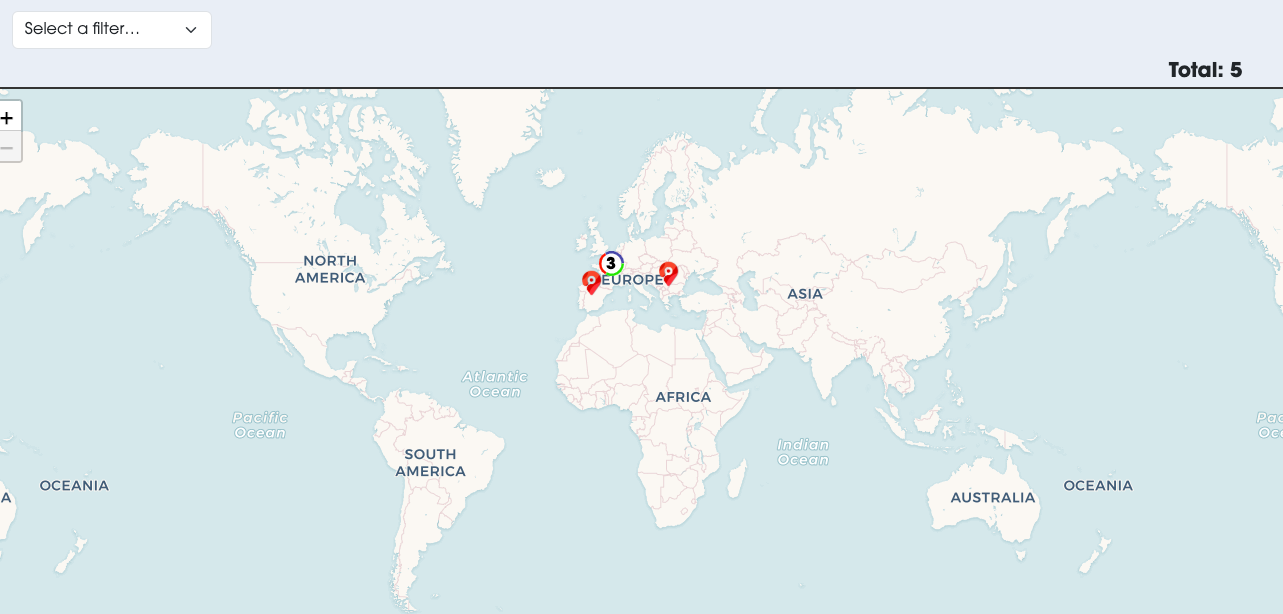
You can visualize all tap events directly in DataUI, under the Inventory & Tracing module.
This map view allows you to:
- See where each tap occurred in real time.
- Verify that interactions happen in the correct countries or regions.
- Detect unexpected activity, such as taps from unapproved locations.
- To make your data context-aware — so that boards and items can react differently depending on where or how they’re used.
- To enable automated monitoring without manual setup.
- To improve traceability and security, especially for international or multi-site deployments.