
Update Product Components
Use enrolui to update your product DPP components.
Prerequisite
- Having an account with editor rights at least.
Automatically generatedComponent categories and fields are automatically generated based on the DPP template.
To create a new component category, you must modify the DPP template.
The fields available for each component are determined by the variables used in the template.
Each component must contain at least a name.
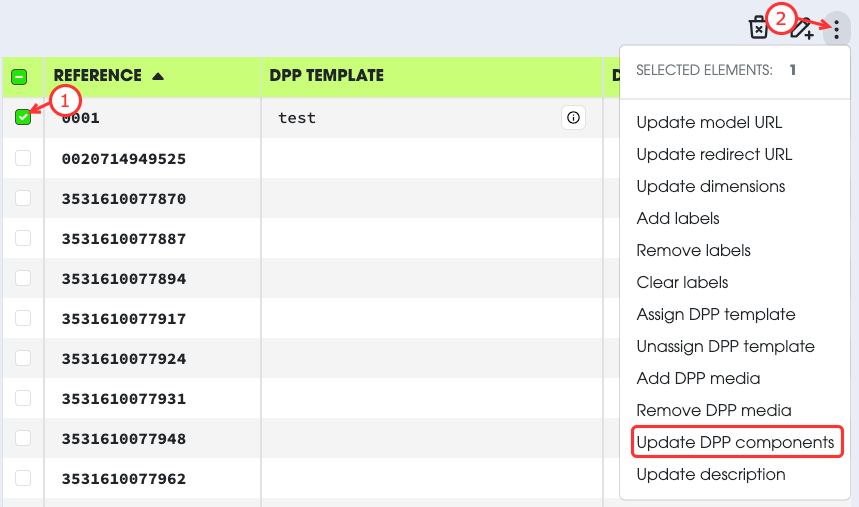
- Select the product you want to modify.
- Open the Action menu.
- Select
Update DPP Components. - Modify the components as needed.
- Submit the changes.
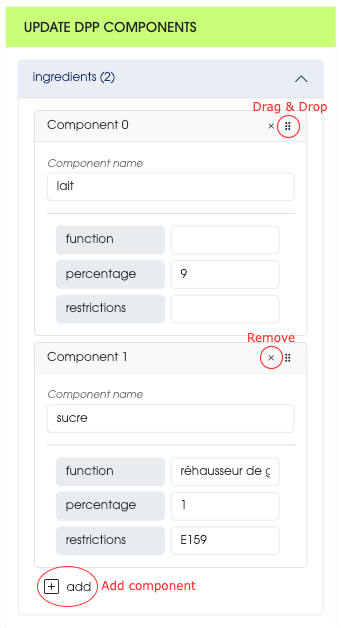
In the form, components are separated by categories.
You can:
- Add a new component to a category.
- Change the order of components by using the drag & drop handle.
(This affects the order in which components appear in the DPP.) - Remove a component.
Irreversible actionThis action replaces the existing list of components.
The components you submit will become the new complete list for the product.
This action cannot be reverted.