Delete Local File
Use lalui to remove unused files from your Lift & Learn box local machine.
- Having an account with editor rights at least.
You can check the current configuration on the lalbox by clicking on the little information button when hovering the lalbox serial.
This will display a popup with all the lalbox information.
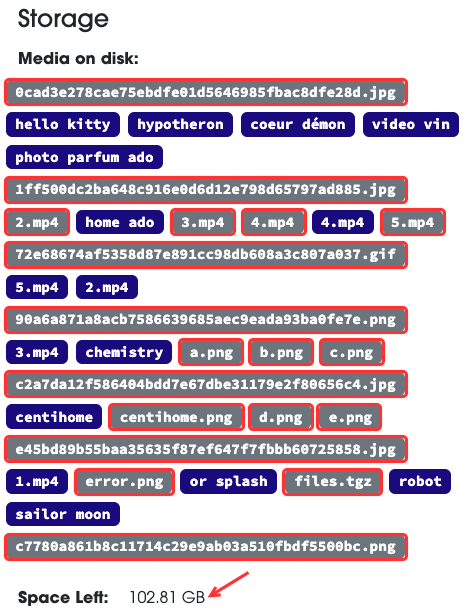
Scroll down to the Storage section.
In this section you will find:
- Media downloaded on the local machine of your LAL box.
- Space left on the local machine of your LAL box.
Medias with a blue background are existing media files.
Medias with a grey background are old media files that no longer exists in the system. They are medias that should be removed
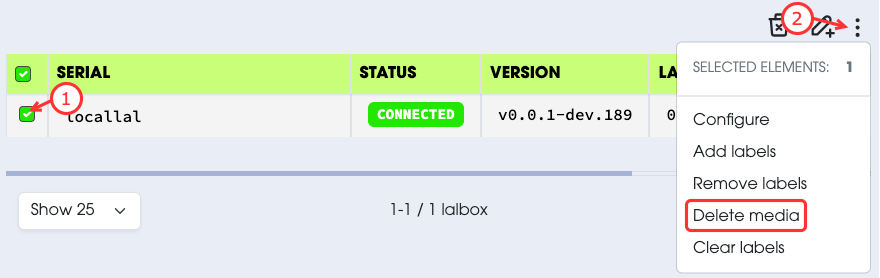
- Select the lalbox from which you want to remove a media.
- Select
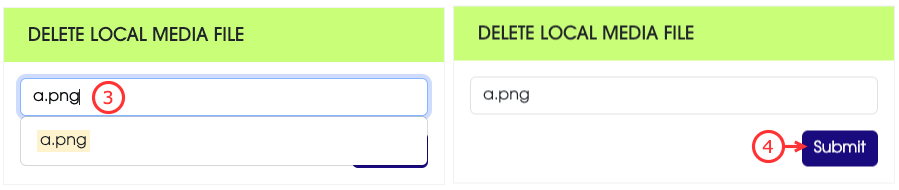
Delete mediafrom the action menu. - Select the media to remove from the list of medias.
- Submit your request.